当前位置:网站首页>【Android Security】Google Hardware-backed Keystore | SafetyNet | Remote Attestation
【Android Security】Google Hardware-backed Keystore | SafetyNet | Remote Attestation
2023-01-19 15:33:18【Jouzzy】
Google Hardware-backed KeyStore Attestation 原理及流程
SafetyNet Hardware-backed Attestation
SafetyNet Hardware-backed Attestation:使用了Hardware-backed Keystore
SafetyNet 支持Software Attestation 和 Hardware-backed Attestation,Depending on whether the device supports itHardware Security Module (HSM)而定.
不同种类的Attestation,会导致Attestation Response的"evaluationType"Field values vary.
如果未进行Hardware-backed Attestation,或者Hardware-backed Attestation失败,则"ctsProfileMatch"值为false.
Hardware Security Module,包括ARM TrustZone、security co-processor like Google’s Titan M等.
对Google手机(例如Pixel)而言,Hardware-backed Attestation,基于Google Hardware-backed KeyStore实现.The process is described below.
ro.boot.verifiedbootstate与Android Verified Boot
ro.boot.verifiedbootstate 代表着BootLoaderunlock status.对于支持HSM(例如TEE)的手机而言,This value is usually stored in HSM中.
以Pixel手机为例,相关的BootLoader验证过程是:
Pixel 在 TEE 中存储BootLoader状态(ro.boot.verifiedbootstate参数).
When the phone starts up,BootLoader会去加载Boot.img,如下图所示: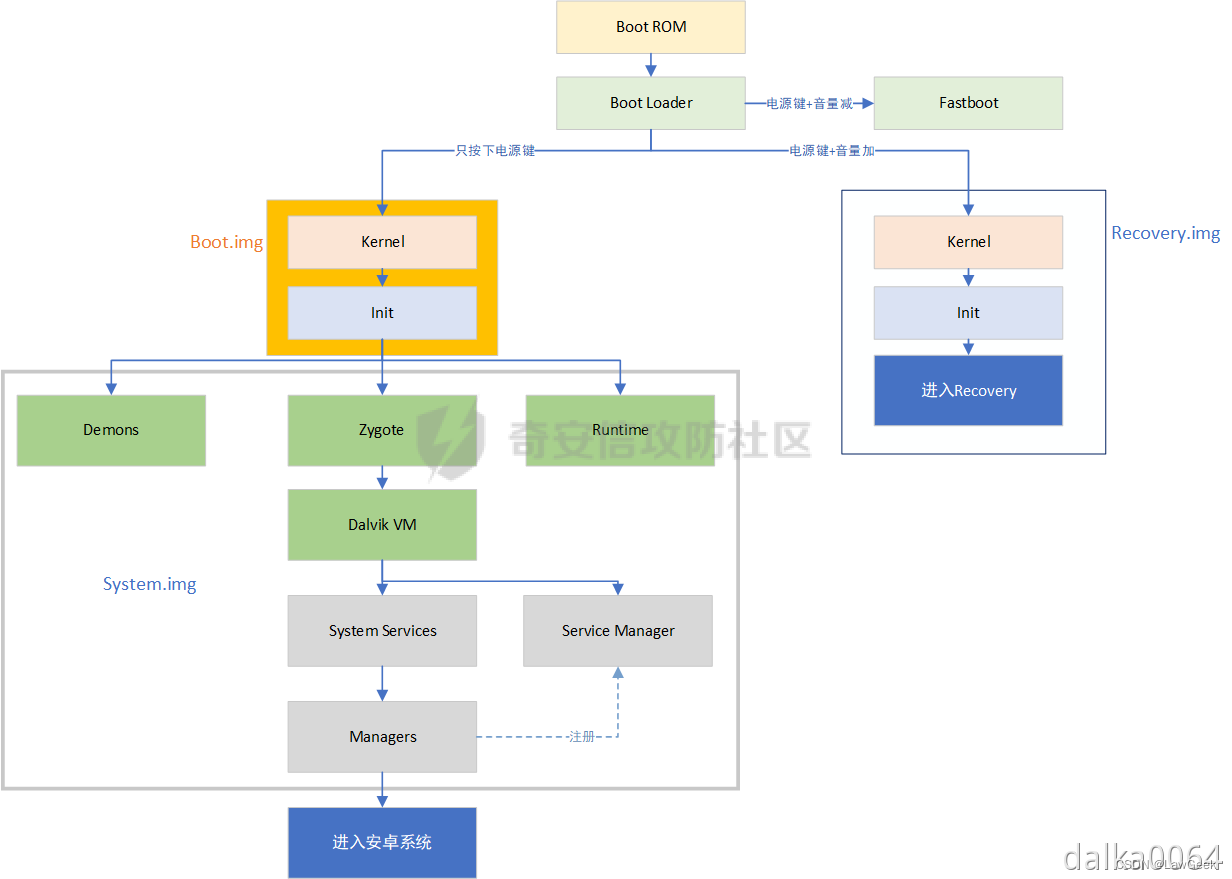
在加载Boot.img之前,BootLoader会去TEE中查询ro.boot.verifiedbootstate的值.
- 如果值为locked,则BootLoader会继续执行 Android Verified Boot,检查Boot.img的签名,And refuse to load unofficial signaturesBoot.img
- 如果值为unlocked,则BootLoader将停止执行 Android Verified Boot,At this time, it is unofficially signedBoot.imgcan also be loaded
题外话:
Commonly used card brushesRoot框架 Magisk,就是对Boot.img的patch.
patched Boot.imgThe signature is naturally unofficial,So it can be flashed inpatched Boot.img的前提是,设备的BootLoader已解锁.
详细原理参见:https://blog.csdn.net/qq_39441603?spm=1000.2115.3001.5343
关于Android Verified Boot,参考:
https://android.googlesource.com/platform/external/avb/+/master/README.md
SafetyNet对Hardware-backed Keystore的使用
从Keystore获取证书链
SafetyNet框架中的DroidGuard VM会从Google Server接收到一段bytecode,and execute this paragraphbytecode.
这段bytecode的执行过程,Some system properties will be queried.后续,These attributes are sent to Google Server,Used to determine device integrity.
System properties contain a certificate chain,The certificate chain is created by Hardware-backed Keystore返回的.
If you want to get the certificate chain,可以调用getCertificateChain().
例如:
Certificate certificates[] = keyStore.getCertificateChain(alias);
方法的文档:
https://developer.android.com/reference/java/security/KeyStore#getCertificateChain(java.lang.String)
Google security-key-attestation官方文档:
https://developer.android.com/training/articles/security-key-attestation#verifying
下面介绍:How this certificate chain is generated、What is that certificate chain、What is the use of this certificate chain
The content and generation process of the certificate chain
本质上:This certificate chain is equivalent to legitimateTEE签名过的ro.boot.verifiedbootstate等值,Indicates that these values are authenticated,是未被篡改的.
the legalTEEThe corresponding public key of the private key is Google备案过的.
the certificate chain生成过程如下:
(1)Google相当于Root CA,手机生产商OEMEquivalent to middleCA,TEEEquivalent to leavesCA
(2)TEE是在Google备案的:
Google用Google私钥签名Google公钥,Form a self-signed root certificate1;
Google用Google私钥签名OEM公钥,形成证书2;
OEM用OEM私钥签名TEE公钥,形成证书3;
(3)当DroidGuardWhen requesting a certificate chain,TEEGenerate a certificate4,证书4的Extensions 中包含ro.boot.verifiedbootstate等值.
而后,TEE用TEEprivate key to sign this certificate4.
(4)TEEReturns a certificate chain,包括:
- 证书4(内容Extensions 包含verifiedbootstate,TEE私钥签名)
- 证书3(内容为TEE公钥,OEM私钥签名)
- 证书2(内容为OEM公钥,Google私钥签名)
- 证书1(内容为Google公钥,Google私钥签名)
需要注意的是:对证书的签名,是The signature of the entire certificate file(Includes metadata and public key),Not just the signature of the public key in the certificate.So in the metadata of the certificateExtensionsIt is also in the signed category,因此ExtensionsThe content in is also authenticated.
The verification process for this certificate chain
Should be done on the server side,The procedure in the case of success is described below.
(1)获取Google根证书列表
https://developer.android.com/training/articles/security-key-attestation#root_certificate
(2)验证证书1在上述列表中
验证证书2signature and certificate1The public key in matches
验证证书3signature and certificate2The public key in matches
验证证书4signature and certificate3The public key in matches
The certificate can thus be explained4The content of the file is not forged
(3)提取证书4中的Extensions,检查其中的ro.boot.verifiedbootstate等值,Based on this, determine the status of the device(例如bootloader是否解锁、是否rooted等),给出"basicIntegrity"、"ctsProfileMatch"的结论
Official verification steps
Google官方文档:https://developer.android.com/training/articles/security-key-attestation#verifying
(1)Use a KeyStore object’s getCertificateChain() method to get a reference to the chain of X.509 certificates associated with the hardware-backed keystore.
客户端使用KeyStore对象的getCertificateChain()method to get the certificate chain(和hardware-backed keystore相关联)
(2)Check each certificate’s validity using an X509Certificate object’s checkValidity() method. Also verify that the root certificate is trustworthy.
Verify the validity of each certificate
(3)On a separate server that you trust, obtain a reference to the ASN.1 parser library that is most appropriate for your toolset. Use this parser to extract the attestation certificate extension data, which appears within the first element of the certificate chain.
提取证书的extension data
(4)Compare the extension data that you’ve retrieved from your ASN.1 parser with the set of values that you expect the hardware-backed key to contain.
将提取出来的extension data和expected values进行比较
(也就是检查extension data中的verifiedbootstate等值)
(3)和(4)It should be done on the server side
服务端实现示例:https://github.com/google/android-key-attestation/tree/master/server
边栏推荐
猜你喜欢
随机推荐
- 负电压是怎么产生的原理分析
- 迟滞比较器Hysteresiswindow和comparator(窗口比较器)原理
- 残留物与电子PCBA 的可靠性和三防漆涂敷前后可能导致电路板出现故障的变量
- 京东探索研究院 | 2023年十大科技趋势
- A variety of Chinese dialect voice landing applications, Microsoft's intelligent voice unlocks more interactive scenarios
- Is Alipay's annuity insurance worth buying?is it safe?
- Which is the top ten insurance for annuity insurance? Is it safe?
- Use MeterSphere beanshell global assertion reference JSONObject solution
- CNN+LSTM+Attention实现时间序列预测(PyTorch版)
- WebView加载heml代码简单应用
- CTA-Sensitive Behavior-AppOps Solution
- Beyond TensorFlow?Yann LeCun: "Why? PyTorch. That's why."
- 蜻蜓安全工作台程序编排简要说明
- WSL2安装systemd方法
- 安信证券开户安全吗?佣金是万几?
- 大智慧在上面开户安全吗?谁能告诉我一下
- 从合并石子学区间DP
- Golang的基本数据类型-基本使用
- 线扫相机DALSA--卡间同步
- 海康visionmaster-图像Bitmap和CmvdImage互转的方法
- 【threejs】根据点绘制直线
- 【threejs】threesjs 初学场景构建
- 第十三章 UML建模
- 为什么很多年轻人,都被 “伪自律” 给拖垮了?
- 小黑年前实习倒数第二天,又到了开心的疯狂星期四的leetcode之旅:剑指 Offer 27. 二叉树的镜像&&剑指 Offer 28. 对称的二叉树
- Servlet —— Servlet API
- 使用nvm管理node版本(window版)
- typescript学习笔记(三)
- vtkPolyData数据的空间变换
- 深入透析 类的 访问修饰符 public、 protected 、private
- C语言基础 — ( 函数——模块化设计)
- Wider Face+YOLOV8人脸检测
- Wider Face+YOLOV7人脸检测
- 【Android安全】Google Hardware-backed Keystore | SafetyNet | 远程证明Remote Attestation
- [转]SteamVR 1.x️一、实现手与物体交互——基于[CameraRig]
- PHP MySQL Where 子句
- PHP MySQL Order By 关键词
- 我理解的卓越工程
- 各种huggingface分词器对比
- PHP MySQL Order By keywords